Table of content
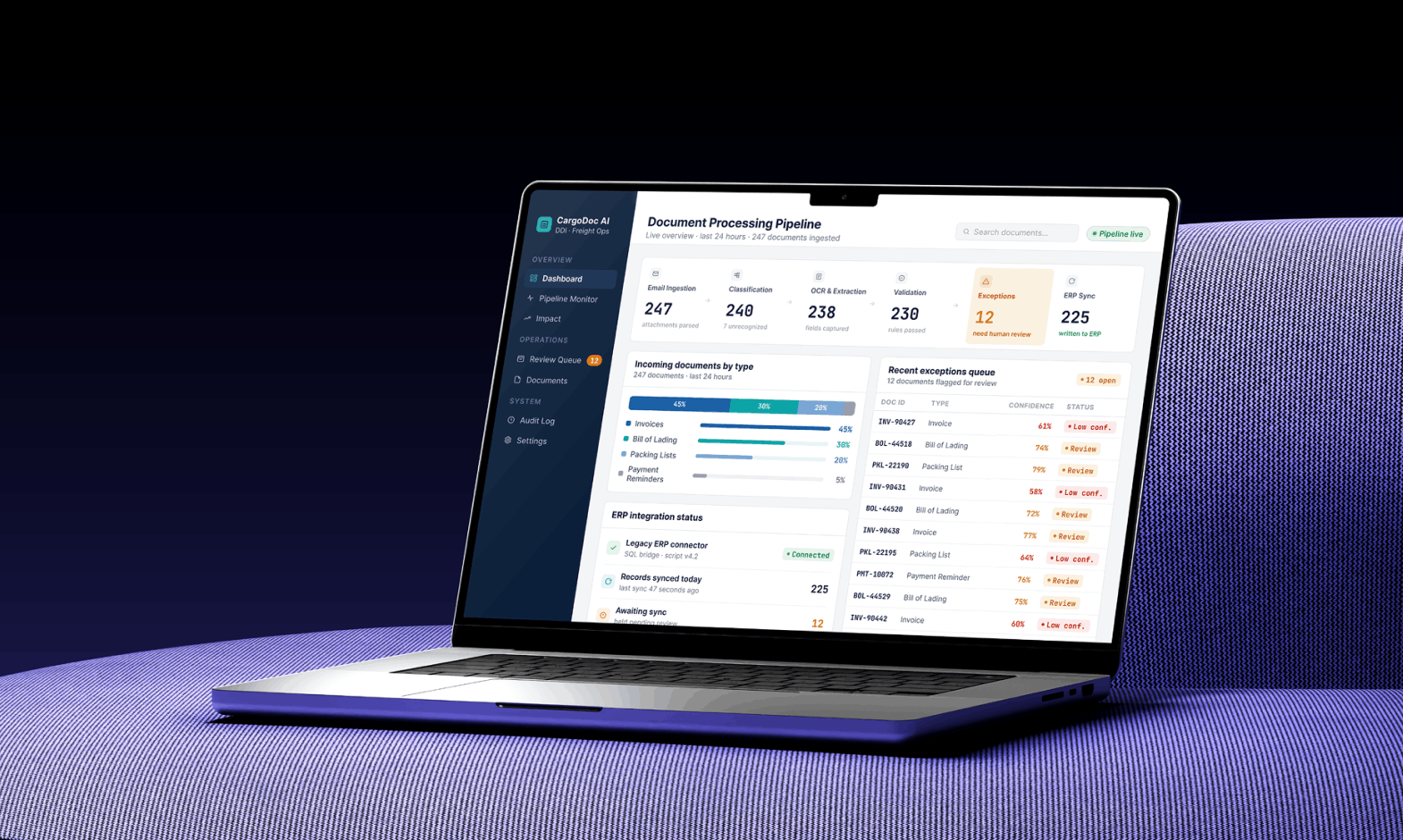
Freight forwarders often rely on ERP and TMS platforms, yet many critical processes still depend on manual work. Document handling, inaccurate delivery estimates, and repetitive customer inquiries continue to slow down freight forwarding operations. In this case study, we explore how DDI Development implemented custom AI-powered solutions to help its client.
The freight forwarding company spent hours processing shipping documents. Employees manually extracted data from PDFs and entered it into the ERP system. Despite having ERP and TMS platforms in place, critical logistics processes still depended on manual work.
Why Freight Forwarders Still Bleed Money on Manual Operations
Most freight forwarders do not lose money because one giant process breaks. They lose it because 50 small processes are “almost fine.”
A fresh example is the EU’s ICS2 customs rollout. FIATA and the Global Shippers Forum warned freight forwarders about poor shipment data causing delays and possible penalties. The problem looks small on the surface: missing item details, vague cargo descriptions, wrong formats, or data sent too late.
That is exactly how manual operations drain money. One field looks harmless until it blocks loading, triggers extra checks, delays clearance, or sends staff back into email threads to fix what should have been clean data from the start.
The mess is predictable: late invoices, mistyped references, repeat update requests, missed delivery penalties, and experienced staff stuck doing low-value admin.
The issue is software that refuses to speak human. Document AI platforms and OCR/ML tools turn unstructured files into usable data. For freight forwarders, AI removes work that should never reach the team.
Case Study: AI-Powered Document Ingestion from Emails into Legacy Freight ERP
A European freight forwarding company with more than 20 years of market experience and more than 100 employees across operations, accounting, and customer service turned to DDI Development team.
The company handled road and sea shipments for manufacturing and retail clients. Its ERP had been customized for years. It was stable, familiar, and deeply embedded in accounting and operations.
It also had one major weakness. It expected structured data, but the business received unstructured documents all day long.
Invoices arrived as PDFs. Some were clean exports from accounting systems. Others were scans. Some emails included multiple attachments with no consistent naming. Some suppliers wrote shipment references in the email body. Some used old templates. Some used no template at all, because apparently “invoice_final_2.pdf” is a global industry standard now.
Problem & Pain: Manual Copy-Paste, Error-Prone Invoices
Before automation, managers opened shared inboxes, downloaded attachments, read documents, found the relevant fields, and copied them into the ERP. The work looked simple until volume increased.
A manager could spend three to four hours per day on document ingestion from unstructured emails. During peak periods, the backlog moved from annoying to dangerous. Invoices waited in the mailbox. Shipment files were incomplete. Accounting had to chase missing references. Customers received corrected invoices after avoidable mistakes.
The worst errors were not big dramatic failures. They were tiny. A “0” became an “O.” A container number lost one character. A shipment reference was copied into the wrong job. A due date was missed. Each error created a tail of extra work: investigation, correction, apology, reissue, payment delay.
The company needed the ERP to stop depending on manual typing.
Key Challenges: Legacy ERP, Unstructured Emails, No API
The technical situation was not friendly. The ERP had no modern API. It had been customized over many years, and changing the core logic would risk breaking accounting workflows. Email formats were inconsistent. Documents included PDFs, images, scans, and forwarded threads. Some attachments contained several document types in one file.
We also had to manage confidence. In freight forwarding, automation that silently enters wrong data is worse than no automation. The system had to know when it was confident and when to ask a human.
So the goal was not “automate 100% and hope.” The goal was safer: automate routine document ingestion, flag exceptions, and keep a full audit trail.
AI Features Built: Document Parser + OCR + Script-Based Integration
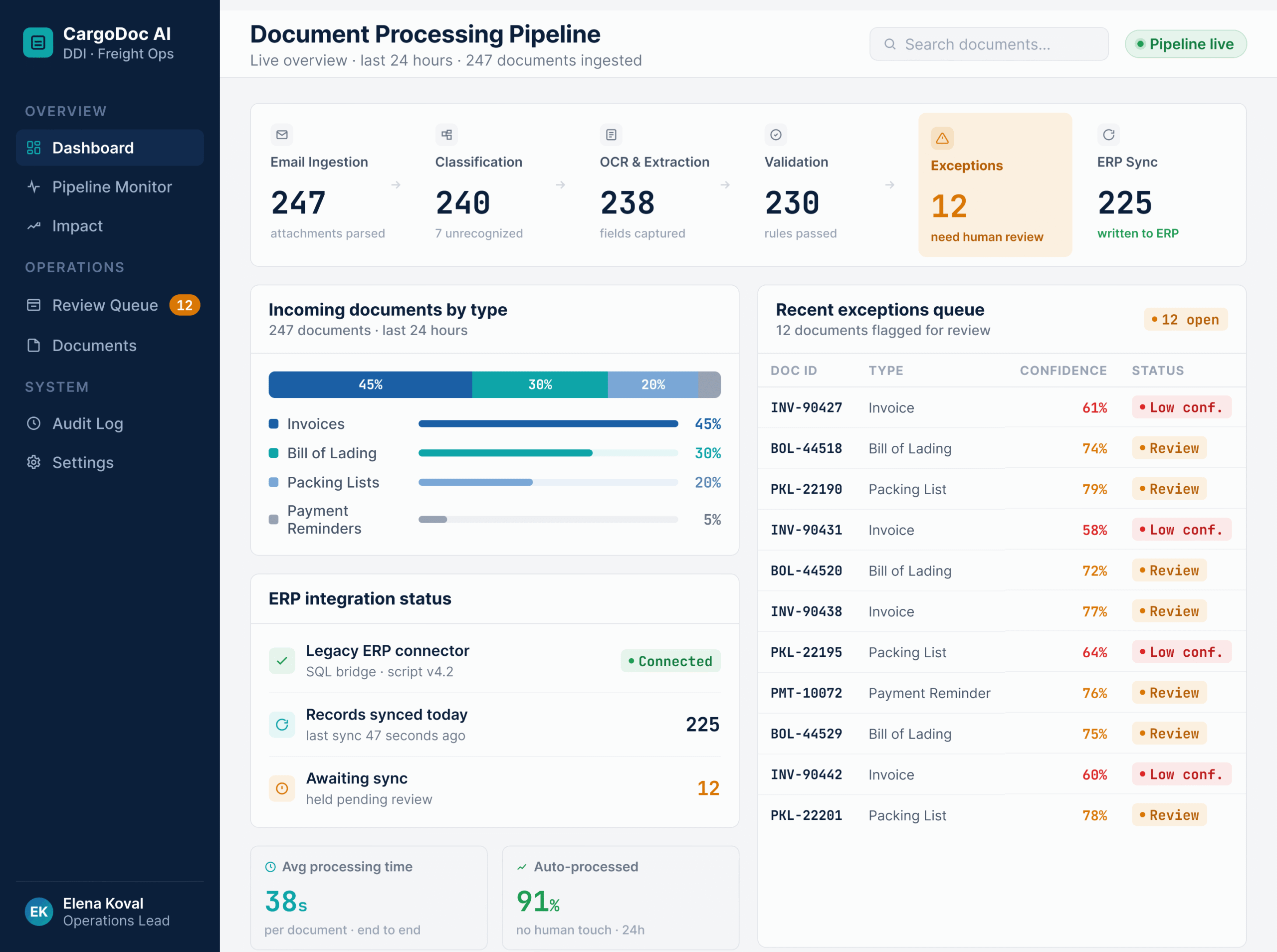
We built an AI document intake layer that sat between the shared inbox and the legacy ERP.
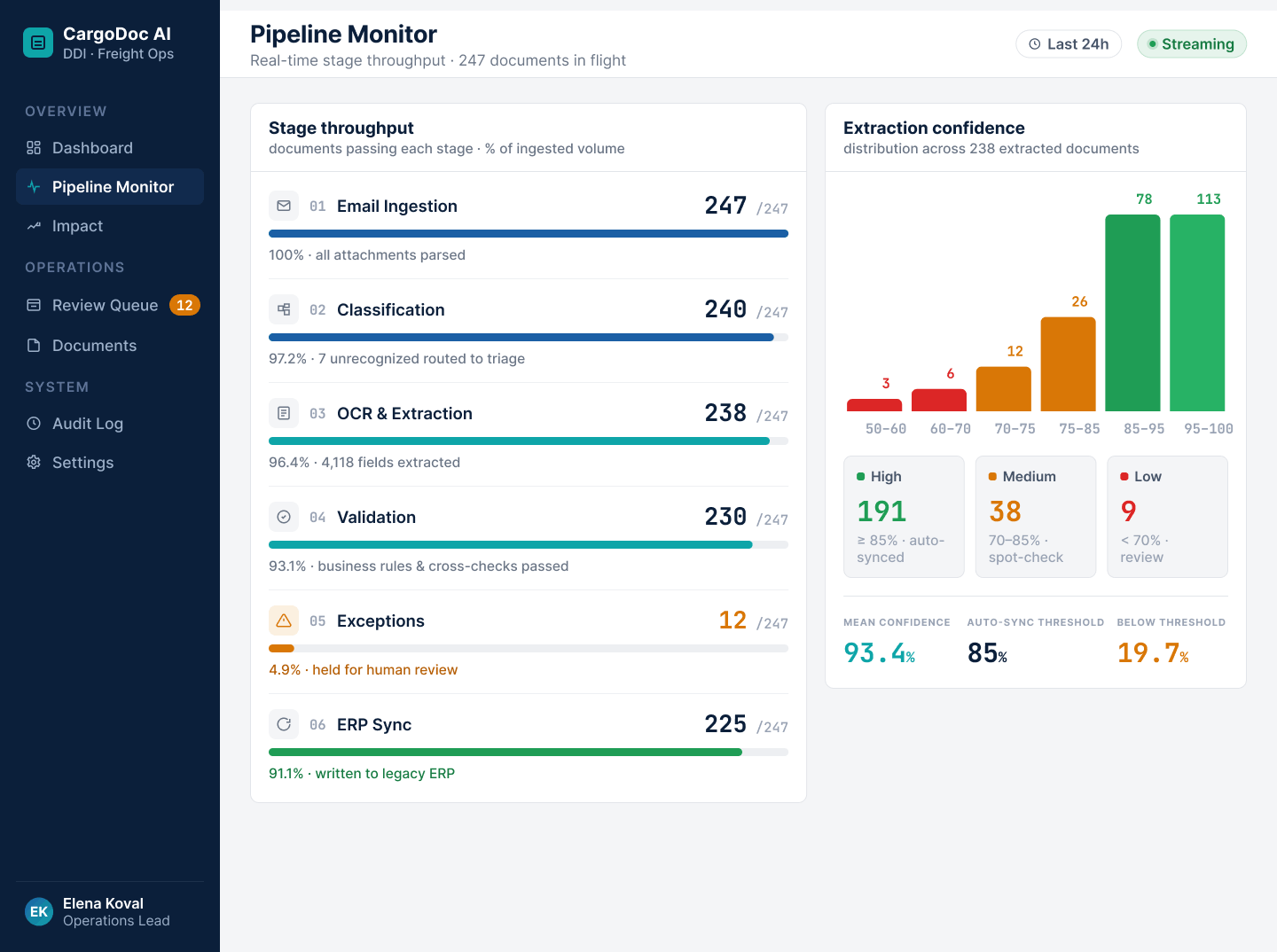
The workflow worked like this:
1. Email ingestion. The system monitored dedicated mailboxes and pulled new messages with attachments.
2. Document classification. AI identified whether the file was an invoice, packing list, bill of lading, delivery note, payment reminder, or mixed document.
3. OCR and layout extraction. The parser read, scanned, and digitized PDFs, extracted tables, text blocks, and key-value pairs.
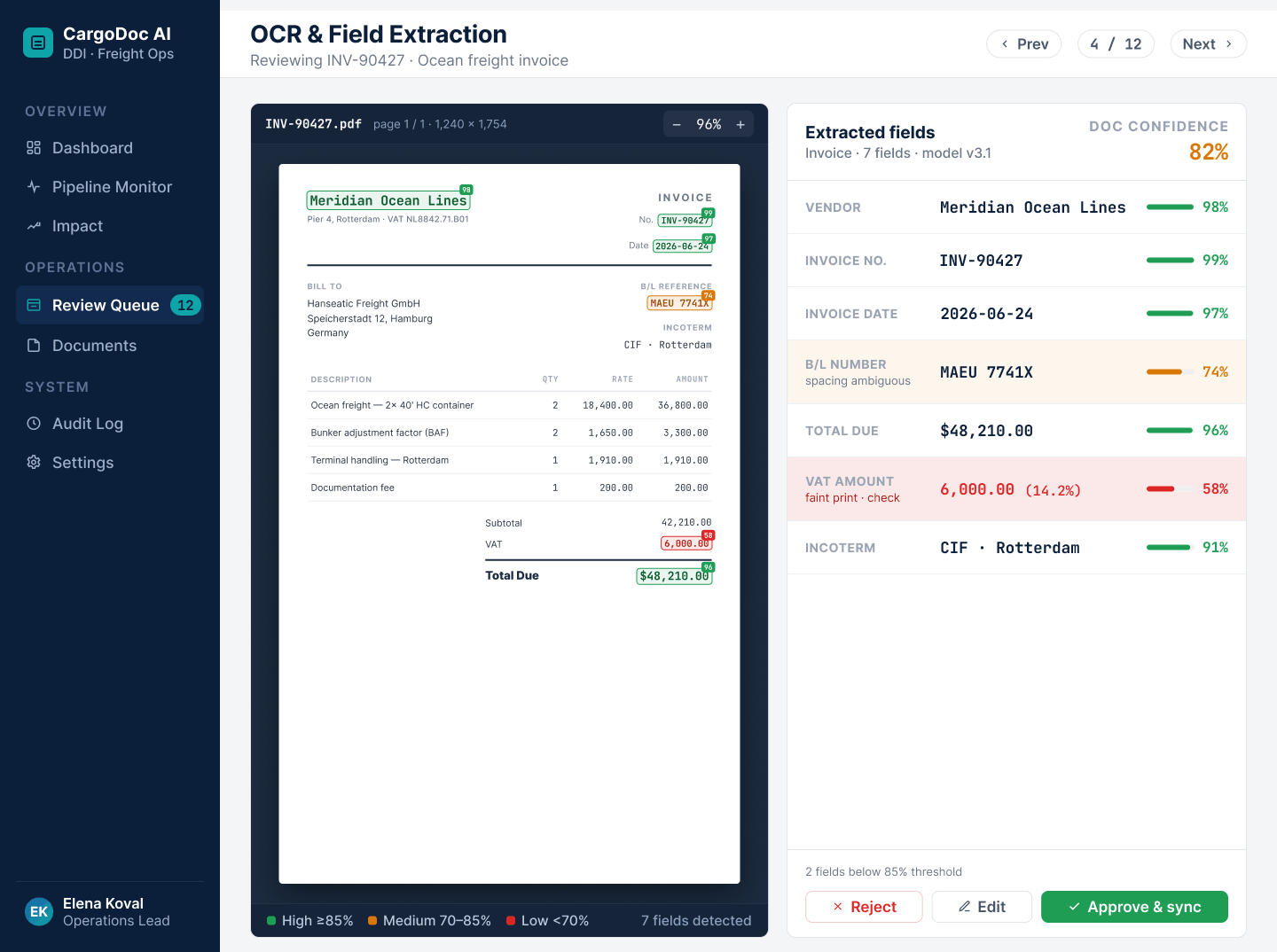
4. Field extraction. The model pulled shipment reference, invoice number, bill of lading number, container ID, customer name, supplier, total amount, tax, currency, due date, and payment terms.
5. Validation rules. The system checked formats, duplicate documents, required fields, currency consistency, and shipment match.
6. Human review for exceptions. Low-confidence fields went into a review queue instead of entering the ERP automatically.
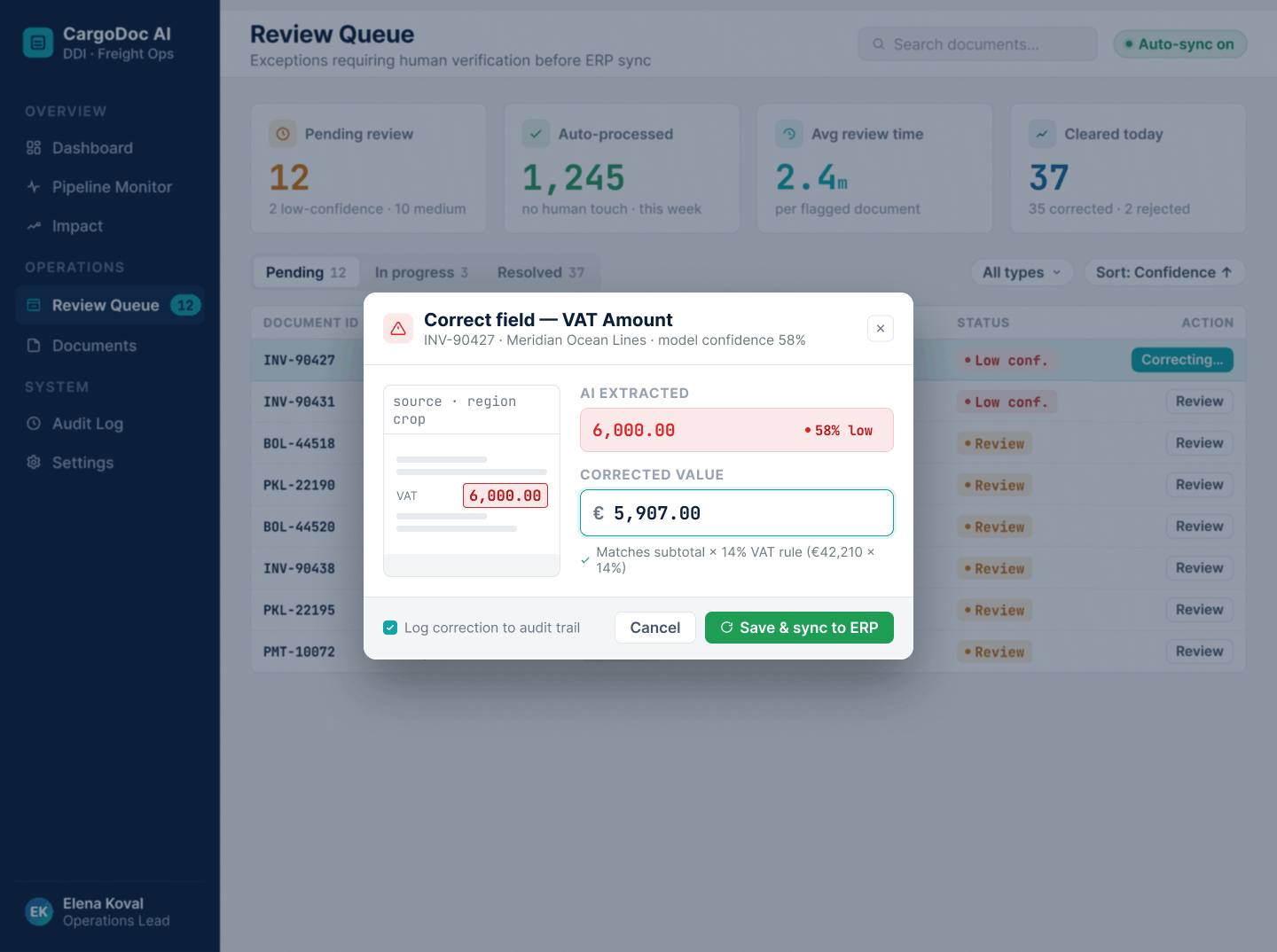
7. Script-based ERP entry. Since the ERP had no API, we used controlled scripts and import routines to push validated data into the correct screens and tables.
8. Audit log. Every extracted field, confidence score, edit, and final entry was logged.
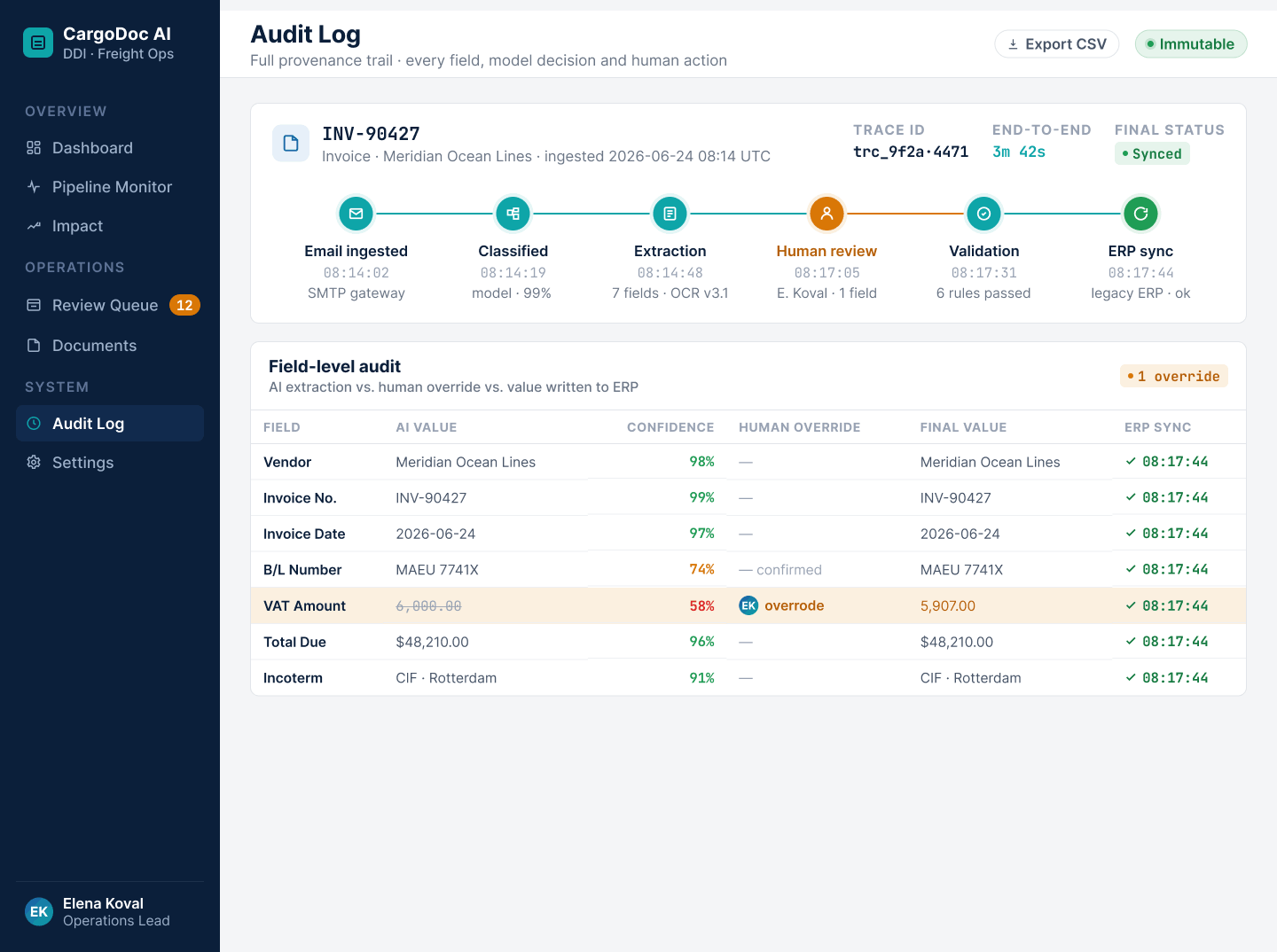
This architecture followed a practical document-AI pattern: classify, extract, validate, route exceptions, and integrate downstream. If confidence was high, the system pushed the data forward. If confidence was low, the manager reviewed only the questionable field, not the whole document. That changed the job from “manual data entry” to “exception control.”
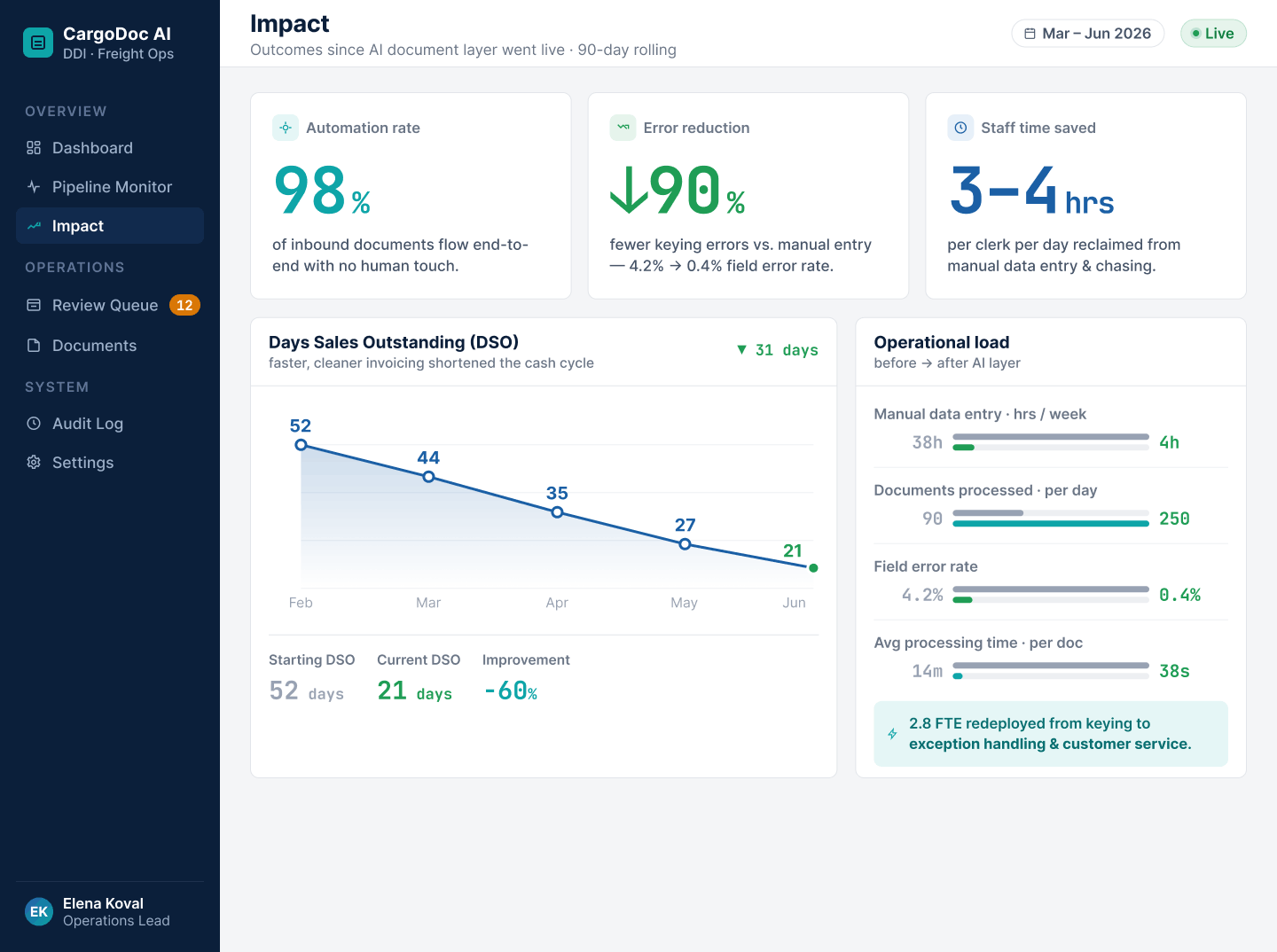
Results: 98% Automated Document Ingestion from Unstructured Emails, 90% Fewer Errors, DSO Reduced
The result was immediate and measurable.
98% of document ingestion was automated. Managers no longer opened every attachment and typed every field. They reviewed exceptions and handled edge cases.
Document errors dropped by 90%. The biggest improvement came from removing manual copying of shipment references, invoice numbers, and bill of lading numbers.
DSO was reduced. The company issued invoices faster because documents entered the ERP faster. Billing no longer waited for inbox cleanup at the end of the day.
The finance team felt the change first. Fewer invoice corrections meant fewer disputes. Fewer disputes meant less payment friction. Operations also gained time because managers stopped acting like unpaid OCR software.
The ERP stayed. The process changed.
That was the win.
What This Document Intake Case Shows: AI Works Best Around the ERP, Not Instead of It
This project was not about replacing the client’s ERP. It was about removing the manual work the ERP depended on every day.
The freight forwarder already had a stable system for invoices, shipment records, accounting workflows, and customer data. The problem sat one layer earlier. Documents arrived as emails, PDFs, scans, and mixed attachments. Managers had to read them, find the right fields, and copy that data into the ERP by hand.
So we built around the real bottleneck.
1. The ERP stayed as the system of record
We did not compete with the ERP. We fed it cleaner data.
The ERP still managed invoices, accounting logic, shipment references, customer records, and internal workflows. The AI layer handled what the ERP was not designed to do well: read unstructured documents, classify files, extract fields, validate data, and flag exceptions before anything reached the system.
For a client-owned ERP, this meant direct code-level integration and custom modules inside the existing system.
The goal stays the same: keep the core stable, and automate the work around it.
2. We automated a painful workflow, not an AI trend
This project did not begin with “let’s add AI.” It began with a clear operational drain.
Managers spent three to four hours every day copying invoice details, shipment references, bill of lading numbers, currencies, due dates, and payment terms from emails and PDFs into the ERP.
That is not just admin work. One wrong digit can attach an invoice to the wrong shipment. One missed due date can delay payment follow-up. One copied amount in the wrong currency can create a finance investigation.
The business case was simple: stop making skilled employees act like human OCR software.
3. Humans reviewed exceptions, not every document
Document automation in logistics cannot run on blind trust. Some scans are unreadable. Some suppliers use old templates. Some emails contain three attachments and half the needed data in the message body.
That is why we used confidence scoring, validation rules, review queues, and audit logs.
The AI handled routine intake. Humans checked only low-confidence fields or unusual cases. This changed the team’s role from manual data entry to exception control, which is exactly where experienced staff should spend their time.
4. Integration followed the client’s reality
Not every logistics system has a clean API. This ERP did not. That did not block automation.
We used the integration method that fit the environment: email ingestion, OCR, document classification, field extraction, validation rules, review queues, controlled scripts, import routines, and audit logs.
Clean architecture matters. But in freight forwarding, working architecture pays invoices.
5. Results were measured in business terms
- The project was not judged by model accuracy alone. It was judged by operational results.
- 98% of document intake was automated.
- Document errors dropped by 90%.
- DSO was reduced because invoices entered the ERP faster.
Managers stopped spending hours on copy-paste. Finance saw fewer disputes. Operations received cleaner shipment files. The ERP stayed, but the manual work around it shrank dramatically.
Why We Never Touched the Core ERP/TMS: And You Shouldn’t Either
Replacing a freight forwarder’s ERP just to automate document intake sounds neat on a slide. In real operations, it usually means risk, delays, and a long migration nobody asked for.
The client’s ERP already handled accounting, shipment files, customer records, billing rules, and years of custom workflows. It was not broken. It simply needed help with the work it was never built to handle: reading messy emails, PDFs, scans, invoice templates, and supplier documents.
That is why we kept the ERP as the system of record and added AI around the painful process.
There are two practical ways this works.
If a client owns their logistics system, such as a custom ERP or TMS, we can work directly inside the existing codebase. In that case, we add AI-powered modules, validation rules, review screens, and data flows without rewriting the core accounting or shipment logic.
If a client uses an external logistics SaaS, the setup is different. We do not have access to the SaaS code, so we build an AI layer on top of it. The layer can connect through available APIs, imports, exports, mailbox monitoring, controlled scripts, or adapter workflows. The SaaS stays in place, while the AI handles document reading, field extraction, validation, and exception routing.
That distinction matters.
Do not replace an ERP just because invoices arrive as PDFs. Do not rebuild a TMS just because a supplier sends shipment references in the email body. Do not touch stable billing logic when the real problem is manual copy-paste.
A safer path is:
- Identify the manual bottleneck.
- Build an AI intake layer around it.
- Connect it to the existing ERP, TMS, or SaaS.
- Validate every critical field.
- Measure the results.
- Expand only after the first process proves value.
That is how the freight forwarder automated document ingestion without turning one painful workflow into a multi-year transformation project. The ERP stayed. The manual data entry disappeared. That was the real win.
Conclusion: How DDI Development Can Help Your Freight Forwarding Company
AI in Supply Chain should not be abstract. It should make daily operations faster, cleaner, and easier to manage. That means fewer copied fields. Better ETAs. Faster customer replies. Earlier invoices. Lower penalties. Less routine work for people who should be solving real logistics problems.
We Solve Your Specific Pains
We start with the part of your operation that already hurts. Maybe your team is drowning in invoices and PDFs. Maybe your ETA accuracy is hurting key accounts. Maybe your customer service team spends half the day answering shipment status questions. Maybe your ERP works, but only because humans keep feeding it manually.
Our AI Solutions Work on Top of Your Legacy ERP/TMS
You do not have to replace your ERP or TMS to automate the processes around it. We can build AI layers for:
- Document parsing and OCR.
- Automated invoice and bill of lading intake.
- Shipment data validation.
- ETA prediction.
- Delay risk scoring.
- Customer communication automation.
- WhatsApp chatbot integration.
- TMS and ERP synchronization.
- Exception dashboards.
- Audit logs and reporting.
The core system stays. The manual work around it shrinks.
Typical Timeline: First Results in 8–12 Weeks
For focused AI automation projects, the first usable results often appear in 8–12 weeks. A typical rollout looks like this:
- Weeks 1–2: process mapping, data review, integration audit.
- Weeks 3–5: prototype, model setup, parsing or prediction logic.
- Weeks 6–8: integration with ERP/TMS, validation, exception handling.
- Weeks 9–12: pilot launch, user feedback, reporting, improvement cycle.
Ready to Automate Your Freight Forwarding Operations? Let’s Talk
Freight forwarding will always have exceptions. That is the business. But your team should not spend its best hours copying PDF fields, guessing ETAs, or typing the same customer update again and again.
DDI Development can help you build AI solutions that sit on top of your current ERP/TMS and automate the work your legacy systems were never designed to handle.
Manual operations kill margins. We build AI layers over your legacy TMS, so your team can focus on real logistics.
Ready to automate document intake or ETA prediction? Let’s Talk.